Saraswat Bank Mobile Banking3.0.1
Continue to app
Free Version
Publisher Description

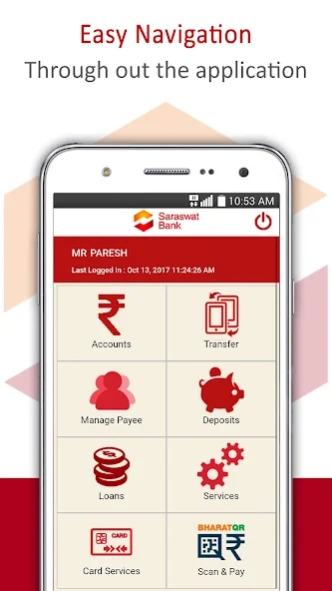
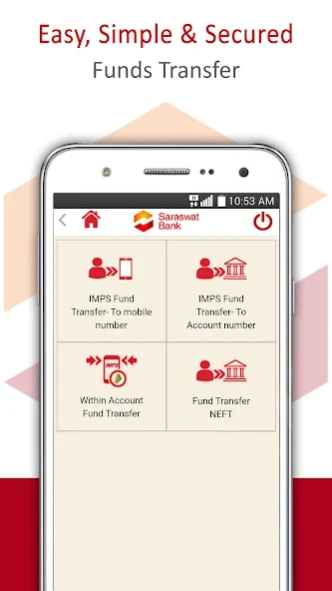
Saraswat Bank “GOMO” is an easy, secure and comprehensive Mobile Banking App
“GoMo” – Mobile BankingFacility of Saraswat Bank lets you check the account balance, view last five transactions, transfer funds within or outside Saraswat Bank, Generate Digital Debit Card, Block / Unblock Debit Card, Request Cheque Book, initiate Stop Payment instructions, and more.
GoMo Mobile Banking app
enables you to scan the Bharat QR code displayed at merchant’s shop / online website through our GOMO app to make payments for purchase of commodity, availing service, bill payments, e-commerce etc.
Features of Go-Mo Mobile Banking:
» Register yourself by entering your Net Banking credentials or Debit card details
» Instant & 24X7 funds transfer service through IMPS
» Fund transfer within your own account, Intra bank or Interbank electronic fund transfer
» Maximum limit for fund transfer is up to Rs. 2 lakhs
» Check balances of your savings, current, Overdraft accounts
» View last five transactions
» Funds transfer to Mobile Number, to account number & through NEFT
» Schedule your fund transfer through NEFT for future date & time
» Addition / deletion of the payee
» Scan & pay through Bharat QR code
» Create & view Term/ Recurring Deposit
» View Rate of Interest for Term / Recurring Deposit
» Loan account details & statement for the same
» Card related services includes Generate Digital Debit Card, Block Unblock Debit card, Debit Card Pin generation & Cardless Cash withdrawal
» Various Value-Added Services -
o Search IFSC code for other banks
o Saraswat Bank branch / Atm locator
o Chequebook request
o Cheque status inquiry
o Stop Payment of Cheque
o Account statement on Email
o Update Email ID
Get Started:
» Keep your Debit Card handy
» Download the application
» follow on-screen Registration Process!
For more details, please visit our website at www.saraswatbank.com
About Saraswat Bank Mobile Banking
Saraswat Bank Mobile Banking is a free app for Android published in the Accounting & Finance list of apps, part of Business.
The company that develops Saraswat Bank Mobile Banking is Saraswat Bank. The latest version released by its developer is 3.0.1.
To install Saraswat Bank Mobile Banking on your Android device, just click the green Continue To App button above to start the installation process. The app is listed on our website since 2026-07-31 and was downloaded 1 times. We have already checked if the download link is safe, however for your own protection we recommend that you scan the downloaded app with your antivirus. Your antivirus may detect the Saraswat Bank Mobile Banking as malware as malware if the download link to com.saraswat.mobilebankingv2 is broken.
The company that develops Saraswat Bank Mobile Banking is Saraswat Bank. The latest version released by its developer is 3.0.1.
To install Saraswat Bank Mobile Banking on your Android device, just click the green Continue To App button above to start the installation process. The app is listed on our website since 2026-07-31 and was downloaded 1 times. We have already checked if the download link is safe, however for your own protection we recommend that you scan the downloaded app with your antivirus. Your antivirus may detect the Saraswat Bank Mobile Banking as malware as malware if the download link to com.saraswat.mobilebankingv2 is broken.
How to install Saraswat Bank Mobile Banking on your Android device:
- Click on the Continue To App button on our website. This will redirect you to Google Play.
- Once the Saraswat Bank Mobile Banking is shown in the Google Play listing of your Android device, you can start its download and installation. Tap on the Install button located below the search bar and to the right of the app icon.
- A pop-up window with the permissions required by Saraswat Bank Mobile Banking will be shown. Click on Accept to continue the process.
- Saraswat Bank Mobile Banking will be downloaded onto your device, displaying a progress. Once the download completes, the installation will start and you'll get a notification after the installation is finished.
Program Details
System requirements
Operating systems
Android
Download information
File size
N/A
Total downloads
1
Pricing
License model
Free
Price
Version History
Here you can find the changelog of Saraswat Bank Mobile Banking since it was posted on our website on 2020-10-11. The latest version is 3.0.1 and it was updated on Soft112 on 12 October, 2026. See below the changes in each version:
version 3.0.1
posted on 2026-07-31
• Minor bugs fixed
version 3.0.0
posted on 2026-03-16
• Minor bugs fixed
• Enhancement of security features for existing users.
